
Monet Launcher - Android TV
KlevicoPersonalization
4.631.00 Reviews
- Version
- 1.0.76
- Installs
- 50.00K
- Age Rating
- Everyone
Screenshots
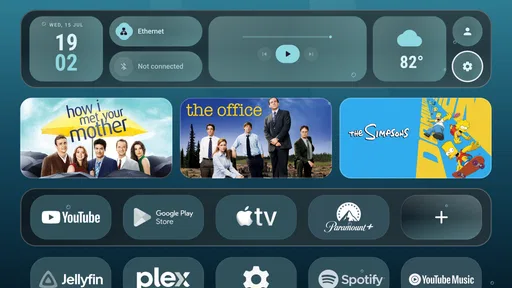
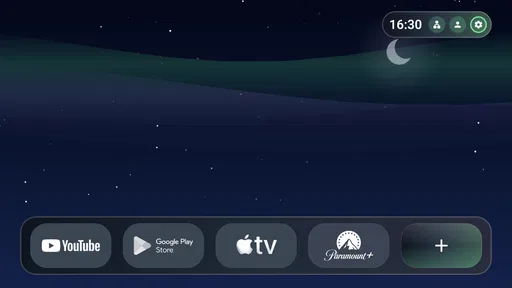
Our Review of Monet Launcher - Android TV
 Analysis by Appyee
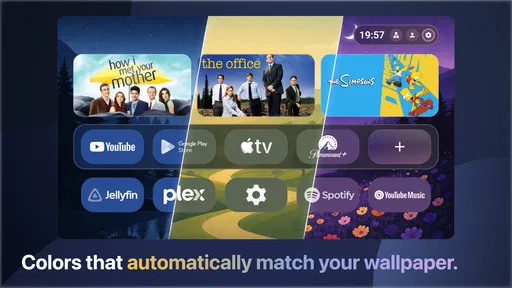
Monet Launcher - Android TV is a personalization app from Klevico that changes the way an Android TV home screen feels by putting Material You styling, dynamic color, weather-based live wallpapers, and widgets at the center of the experience. I spent time looking at it less as a decorative theme and more as a daily launcher: the important question is whether the screen becomes easier and more pleasant to use every time the television turns on.
My overall impression is that its strongest idea is visual continuity. Instead of treating the launcher background, accent colors, weather information, and widgets as separate decorations, Monet Launcher aims to make them feel like one environment. That matters if your television is part of a room rather than just a screen. The interface can feel more connected to the rest of an Android setup, especially when you prefer a calm, coordinated appearance over the standard rows of app icons.
Dynamic color is the feature that defines the experience
The most meaningful capability here is the Material You-inspired dynamic color approach. In ordinary use, color is easy to dismiss as a cosmetic detail, but on a large television it affects how quickly I can understand the home screen. A coordinated background and accent palette can make selected items, widgets, and sections easier to distinguish without making the whole interface look noisy.
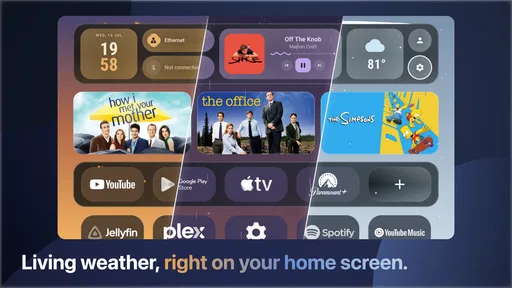
What I like about this concept is that it gives the launcher a sense of change without requiring me to redesign the screen every day. The weather live wallpaper adds movement and context, while the color treatment helps the rest of the layout feel intentional. It is a gentler kind of personalization than constantly replacing backgrounds or downloading elaborate themes.
That does not mean dynamic color automatically improves every television. A bright or busy wallpaper can compete with small text and app labels, and a palette that looks attractive in a phone-style preview may feel too strong when stretched across a large display. The real benefit depends on choosing a background and widget arrangement that preserve readability from the sofa. I would judge this launcher primarily by that balance, not by how impressive the first setup looks.
The app also belongs to the practical side of personalization rather than the purely decorative side. Widgets can turn the home screen into a quick information panel, and the weather presentation gives the background a reason to change beyond aesthetics. I find that combination more useful than a launcher that only swaps icons or wallpapers, because it can make the first screen relevant before I open a streaming app.
What changes when the television becomes a personal dashboard
A normal Android TV launcher usually emphasizes application access. That is sensible, but it can make the home screen feel like a fixed shelf: the same rows, the same visual hierarchy, and little connection to the room or the time of day. Monet Launcher takes a different route by making the surrounding atmosphere part of the interface.
In my view, this is most successful when I want the television to look presentable even when nobody is actively watching something. The screen can feel less like an idle menu and more like a designed display. That is a subtle improvement, but it is exactly the sort of improvement a personalization app should provide.
There is also a useful distinction between personalization for the owner and personalization for everyone in the room. A phone launcher can be intensely individual because one person holds the device. A television launcher has to remain legible and comfortable for several people sitting at different distances. The dynamic-color idea works best when I use it to create a clear shared layout, not when I treat the TV as a place for tiny details or overly elaborate decoration.
How I would use it in practice
The first thing I would do after installing it is resist the temptation to add every available visual element at once. I would begin with the wallpaper and overall color mood, then add only the widgets that answer a question I actually have when the television starts. For example, weather information can earn its place because it is immediately understandable; an extra widget should justify itself just as clearly.
This staged setup is one of my practical recommendations because a launcher can become less useful when its personalization options create visual competition. On a television, spacing and contrast matter more than the number of elements on screen. I would sit at the normal viewing distance, check whether labels remain easy to read, and remove anything that makes the app row harder to scan.
The weather live wallpaper is particularly worth evaluating over several days rather than during a single setup session. A moving background may look appealing at first but become distracting during pauses, menus, or conversations. If I were setting up a family room, I would choose the calmest presentation that still gives the screen some life. In a bedroom or a secondary room, I might accept a more noticeable effect because the television is less likely to compete with other activity.
Widgets should be treated as shortcuts to decisions, not as decoration. A useful arrangement might put the most frequently opened entertainment apps where the remote reaches them naturally, while keeping weather information visible but not dominant. I would avoid building a dense information wall: remote navigation is slower than touch, so every extra item adds friction.
One non-obvious advantage of this approach is that it encourages me to organize the home screen around viewing habits rather than app ownership. Instead of asking which apps I have installed, I would ask what I want to do when the TV starts: resume something, browse, check the weather, or open a particular service. That shift can make the launcher feel faster even when the underlying apps have not changed.
A realistic evening with the launcher
Imagine coming home and turning on the television before deciding what to watch. With a standard launcher, I might immediately face a familiar list of services and start moving through them. With Monet Launcher, the weather presentation and widgets can make the first screen feel more informative while I decide. I can glance at the conditions outside, see the coordinated background, and then move toward the app I want without first opening a separate weather tool.
That scenario is not revolutionary, but it shows where the app makes sense: during the small moments before viewing begins. It is less about transforming navigation completely and more about making the idle and transitional parts of television use feel considered. If I already know exactly which app I will open every time, the visual layer may matter more to me than the information layer.
For a shared household, I would keep the arrangement deliberately obvious. Large, familiar destinations should remain easy to reach, and the dynamic styling should support the layout rather than hide it. Guests should not need an explanation before they can find the main entertainment apps. This is where a restrained configuration will usually outperform a highly customized one.
Where it differs from ordinary launcher alternatives
The usual Android TV launcher is generally the safest choice for people who want familiarity, predictable navigation, and minimal setup. It tends to prioritize installed services and recommendations, while a personalization launcher like this puts more attention on the appearance and atmosphere of the home screen. Neither approach is universally better.
I would choose the standard option if my main concern were immediate compatibility with an established household routine. If everyone already knows where each app sits and nobody cares about the background, changing launchers introduces a learning step without solving a real problem. Monet Launcher is more compelling when the default screen feels bland, cluttered, or disconnected from the way I want the room to look.
Compared with a simple wallpaper app, it offers a broader idea of personalization because the color system, weather visuals, and widgets are meant to work together. A wallpaper-only tool can be easier to understand and may be preferable if I want no change to navigation. The trade-off is that it will not provide the same unified launcher presentation.
Compared with a heavily configurable third-party launcher, Monet Launcher appears better suited to people who want a clear visual direction rather than an endless list of layout decisions. That can be a strength for me: too many controls often lead to a setup that is technically personal but tiring to maintain. The downside is that users who enjoy fine control over every row, shortcut, and behavior may find a design-led launcher less satisfying.
The app is free to install, which makes experimenting with the basic experience straightforward. It also includes in-app purchases priced at $4.99 per item, so I would look carefully at which optional elements matter before paying for anything. The sensible approach is to use the free experience long enough to decide whether the launcher changes my daily routine, rather than buying extras simply because the visual presentation is attractive.
The trade-offs I noticed before recommending it
The biggest trade-off is that a more expressive home screen can demand more attention. Dynamic wallpapers and coordinated colors are valuable only while they remain subordinate to navigation. If the background reduces contrast or the widgets make the screen feel crowded, the personalization has started working against the launcher.
There is also a maintenance question. A static launcher can be set once and forgotten. A weather-oriented design is more appealing when its content feels current, which means I would pay more attention to how the screen looks in different conditions and at different times. That is not a serious burden, but it is part of choosing a live presentation instead of a fixed image.
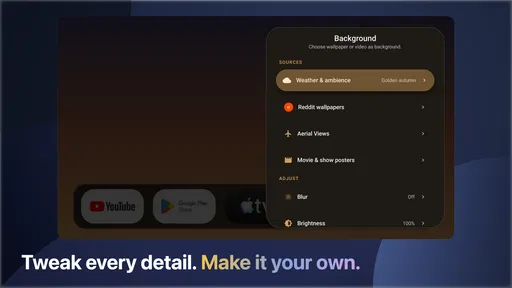
Remote control navigation is another practical limitation to keep in mind. On a phone, rearranging widgets or exploring visual settings is quick because I can tap directly. On a television, every move through a menu takes a little more patience. I would do the creative setup when I have time, then leave the home screen stable rather than constantly tweaking it from the sofa.
Performance expectations should also be realistic. A live wallpaper and widgets are more active than a plain static background, so users who value the lightest possible interface may prefer a simpler launcher. I would especially avoid unnecessary visual complexity on older hardware, where a clean fixed layout is often more important than animation.
The app is rated for Everyone, and it is intended for Android devices running version 8.0 or newer. That makes it approachable for a broad range of users, but compatibility on paper is not the same as an identical experience on every television. Screen size, remote behavior, manufacturer software, and the existing launcher setup can all affect how comfortable the result feels. I would test the core navigation before investing time in detailed customization.
One useful trade-off is between atmosphere and speed. If I want to turn on the television and reach a familiar app with as few visual steps as possible, the default launcher may remain the better tool. If I want the screen to communicate something before I choose content, Monet Launcher earns its place. The right choice depends on whether the home screen is merely a launch point or part of the room's ambience.
Small setup decisions that make a large difference
I would keep the most important app destinations grouped consistently and use the visual customization to frame them, not scatter them. The first screen should answer the basic question, “What can I do now?” without requiring a search through widgets or decorative panels.
I would also check the launcher in both bright and dark room conditions. A palette that looks balanced during the day may feel too dim at night, while a bright wallpaper can become irritating in a dark room. This is a better test than judging the design only from the settings screen.
Another practical tip is to treat weather as a glanceable cue rather than a replacement for a full forecast app. It belongs on the launcher because it can help with a quick decision, such as whether to go outside or keep an evening indoors. For detailed planning, I would still open a dedicated weather service. Keeping that boundary clear prevents the widget from becoming clutter.
Finally, I would take a short break after setup and return to the television later. If I immediately miss the old layout, that is useful information. A launcher should reduce friction over repeated use, not merely look impressive during the first ten minutes.
Who gets the most from Monet Launcher
I think this app is best for Android TV owners who care about the appearance of the home screen and want more than a static wallpaper. It suits someone who enjoys Material You-style design, appreciates a weather-aware background, and is willing to spend a little time arranging widgets for a shared screen.
It is also a good fit for a television that stays visible in a living room, kitchen, office, or bedroom. In those spaces, the screen may be idle often enough that its presentation matters. The launcher can make those idle moments feel less empty while still keeping entertainment access nearby.
I would be more cautious about recommending it to someone who wants the absolute simplest route to streaming apps. If the default launcher already feels clear and fast, the additional visual layer may not justify changing habits. I would also steer away from it for anyone who dislikes live backgrounds, prefers a completely static interface, or expects deep control over every launcher behavior.
The developer, Klevico, has positioned this as a focused personalization tool rather than a general-purpose replacement for every Android TV workflow. That focus is helpful: I know what I am trying to improve. The app has a 4.6 average from around 1.8 thousand ratings and has passed over 50 thousand installs, which suggests that its visual approach has found an audience, while the current version, 1.0.76, gives prospective users a clear point of reference when checking compatibility.
Because it is free to start and rated for Everyone, I see little reason not to try the basic launcher if the concept appeals to you. I would simply judge it by repeated use: can you find your usual apps comfortably, does the weather presentation remain pleasant after the novelty fades, and do the widgets help rather than crowd the screen?
My recommendation is positive, with a specific condition: choose Monet Launcher for a more coherent, weather-aware TV atmosphere, not merely because you want another row of icons. Its dynamic color capability is the reason to install it, and its success depends on using that capability with restraint. When the palette, wallpaper, widgets, and app access remain balanced, the television feels more personal without losing its purpose. When decoration takes over, the familiar default launcher is likely the smarter choice.
For me, that makes Monet Launcher a worthwhile option for people who see Android TV as part of their home’s visual environment. It does not need to replace every launcher style to be useful. It only needs to make the first screen more pleasant and more relevant each time the television wakes up—and for the right user, that is a meaningful improvement.
Verdict
Strengths of Monet Launcher - Android TV
- Designed specifically for Android TV screens and remote navigation.
- Provides a clean, lightweight alternative to crowded default launchers.
- Makes favorite apps easier to reach from the home screen.
- Offers a more organized layout for media-focused devices.
- Can improve the visual consistency of older Android TV interfaces.
Limitations of Monet Launcher - Android TV
- Customization options may be limited compared with advanced launchers.
- Some TV boxes may show compatibility or layout issues.
- Ads or promotional content may appear depending on the version.
- Changing the default launcher can require extra Android TV settings.
- Updates and support may vary across different device manufacturers.
Similar Picks in This Category
View All
Microsoft SwiftKey AI Keyboard
SwiftKey4.3

Wallpapers
Google LLC4.1

Zedge™ Wallpapers & Ringtones
Zedge4.7

Yandex Browser with Alice AI
Direct Cursus Computer Systems Trading LLC4.3

Ringtone Maker:create ringtone
Big Bang Inc.4.7

Fonts Keyboard
Fonts Keyboard3.9
Frequently Asked Questions
What is Monet Launcher - Android TV, and what does it do?
Monet Launcher - Android TV is an alternative home-screen launcher designed for Android TV devices and TV boxes. It replaces the default interface with a more organized layout for accessing installed apps, settings, and other content. During testing, its main appeal was the cleaner presentation and the possibility of giving an older or less attractive Android TV interface a more modern appearance.
Is Monet Launcher compatible with every Android TV device?
Compatibility can vary depending on the device, Android version, manufacturer restrictions, and whether the product uses certified Android TV or a modified Android system. It should work best on supported Android TV hardware, but some televisions, TV boxes, or operator-provided devices may limit third-party launchers. Before installing, check the app listing and confirm that your device allows users to select an alternative default launcher.
Can Monet Launcher be set as the default launcher on Android TV?
In many cases, Monet Launcher can be selected as the home application, allowing it to appear whenever you press the Home button. However, Android TV manufacturers and custom firmware may handle this differently, and some devices prevent users from replacing the built-in launcher. If the option is unavailable, you may still open Monet Launcher manually, but the experience will not be as seamless.
Does Monet Launcher affect the performance or speed of an Android TV device?
The launcher itself is intended to provide a lightweight replacement for the standard Android TV home screen, but its impact depends on your device's processor, available memory, installed applications, and background services. On older hardware, any additional customization may cause occasional delays. If you notice slower navigation, crashes, or excessive memory use, returning to the original launcher may provide a more stable experience.
Is Monet Launcher safe to install, and what should I check before downloading it?
As with any launcher, installation should be performed from a trustworthy source, preferably the official Google Play listing or the developer's verified distribution channel. Review the requested permissions, developer information, update history, and user feedback before proceeding. Because a launcher controls the main interface, avoid unofficial modified APK files and make sure you know how to restore the default launcher if the app does not work properly.
